How to Start an Internet Radio Station
Everything you need to know about starting an Internet radio station.
14 day free trial – No credit card required – No commitment
If you’ve always dreamt of starting an Internet radio station but thought it was reserved for professionals, think again! Anyone can create an online radio! Below you’ll learn everything you need to know about setting up an Internet Radio station. After reading this step-by-step guide you could be ready to broadcast today!
1/ How do online radio stations work?
2/ Why start your own Internet Radio Station?
3/ What is the best radio hosting solution?
4/ How to create your radio station step by step
5/ How much does it cost to start an Internet radio station?
6/ Which equipment will I need to start an Internet radio station?
7/ What software do online radio stations use?
8/ How to grow your radio station’s audience
How do online radio stations work?
First, let’s take a quick look at how online radio works and one of its biggest advantages.
An international scope
Internet radio has no geographical boundaries, so a radio host in London can be heard from Sydney or Rome thanks to the power of the Internet. It’s also much cheaper and has fewer restrictions compared to traditional radio. Starting an online radio station is fairly simple and requires only a computer, a microphone and an Internet connection to start broadcasting.
Want to limit where your stream can be heard? The geo-protection feature lets you choose which countries can access it.
Manage a radio from anywhere
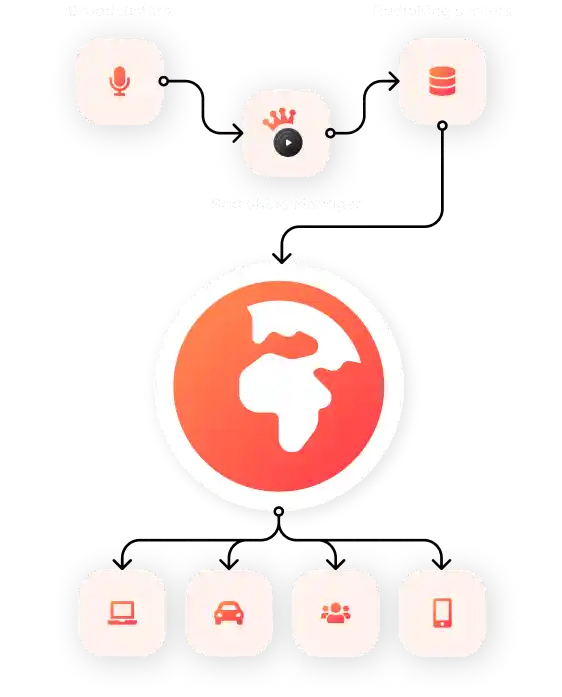
Online radios work on the same principle as that of any popular radios you’re used to listening to in your car or on your traditional radio set. The only difference is that you won’t have any land borders thanks to the power of the Internet! With the help of an online radio host such as RadioKing, you can conceive automatic or live broadcasts from home and send them to a radio server with a simple click.
This radio server will then be in charge of sharing your programming worldwide via different media connected to the Internet. This could include: listening directories, social media, a website, a mobile application, a connected car and even on a connected speaker.
You also choose how you broadcast: go live, air pre-recorded shows, or let automated playlists keep your station running 24/7.
Why start your own Internet Radio Station?
It may seem that online radio is only for experts and technicians. In reality, just about anyone can start their own radio station today.
Increase in radio stream
Radio streaming remains a popular medium that gains new listeners every month. The lockdown we experienced in 2020 proved it to us by a strong increase in audiences and the creation of new radios, each more imaginative than the last. Creating your own radio on the Internet is therefore an opportunity to federate a community and share content that is different from what we are used to hearing on big FM stations, while freeing ourselves from the geographical limits imposed by this technology.
It’s also the only media capable of fully integrating our daily lives: whether it’s in the morning at breakfast, in the car or at work. Radio is a medium capable of giving rhythm to our lives like no other media. Deprived of an image, it encourages our imagination and can be listened to everywhere while pursuing other activities. There are so many good reasons to create your own radio station!
Create and manage a radio station community
To determine if you’re ready to get started, you need to take the time to imagine a concept. A unique and original radio concept will attract loyal listeners. On the other hand, if you want to compete with an existing radio station, we recommend that you take the time to analyze it. Try to identify possible areas for improvement that you could apply to your own radio station and differentiate yourself.
The following questions will help you to quickly define the basics of your radio project and build your community:
- Why do you want to start this radio station?
- What exactly do you want to share with your listeners?
- Who is your target audience?
- What name would you like to give this radio station?
- What type of radio broadcasting will you do? Only music?
- What genres of music will you broadcast?
- Will there be other radio hosts or DJs? If so, how many?
- Do you want to go live regularly, or run a fully automated station?
- What kind of topics will the radio station cover?
- Are you going to do call-in shows?
- How will your radio be different from others?
Your answers define your format. The clearer your format, the easier it is to attract and keep loyal listeners. Then plan your programming and schedule. Consistent broadcasting times help your audience build listening habits. Identify the hours when your target listeners are most likely to tune in, and place your key shows there.
To go further in creating and protecting your Internet radio station, we invite you to read this article on how to find the right idea for your radio station.
No technical skills required
You don’t need to be a sound engineer to run a radio station. For an automated station, a computer, an Internet connection and a single MP3 file are enough to get started. In the Radio Manager, you build your schedule by dragging and dropping your tracks and shows. If you get stuck, the Help Center tutorials and our technical team are there to help.
Go live from home, with guests anywhere
Your studio can be your living room. You can also bring listeners and guests on air remotely, without anyone leaving home. It’s an easy way to vary your shows and meet new voices.
Total freedom over your content
What you broadcast is entirely up to you: a music-only station, a talk radio, or a mix of both. It’s the perfect way to share a passion or an expertise and to connect with listeners who share your interests.
Listeners can tune in on any device
No radio set needed: anyone with an Internet connection can listen, on a computer, smartphone, tablet, smart speaker, smart watch, smart TV or connected car, wherever they are.
What is the best radio hosting solution?
There are many available solutions to host your radio on the Internet. However, there is no magic formula that suits everyone! The best solution will be the one that best suits your skills, your equipment and your goals.
Host your own radio station yourself
The first one is to host your own radio yourself. To do so, you must have serious technical knowledge, but also an Internet connection with a high upload speed. Bear in mind that your computer will need to be turned on constantly. This is a solution that may seem economical, but it does not guarantee you a stable and professional outcome.
Host on a specialised streaming
The other solution is to entrust the hosting of your radio to a specialised streaming service. Many companies like RadioKing can help you in the creation and broadcasting of your radio all over the world. However, each solution will not offer you the same expertises and functionalities.
Host your radio station on RadioKing
Here at RadioKing, we offer our solution to more than 3,000 radios in over 170 countries. From individuals, to associations and companies, our turnkey solution has been adapted over time to meet everyone’s requirements. It includes:
An intuitive Radio Manager
The user-friendly design of the Radio Manager makes it incredibly simple to get to grips with. Whether you’re on Windows or Mac, manage your radio station online with a simple browser, anywhere in the world.
From this central dashboard, you monitor your broadcast in real time, manage your media library, schedule shows and check listener statistics.
24/7 automatic broadcasting
Schedule playlists in advance and set rotation rules so there is always something on air, even when you’re away from the microphone. If nothing is scheduled, the Radio Manager automatically plays music from your media library: no dead air, at any time of day.
High broadcasting quality (up to 320Kbps)
Offer your listeners a great listening experience by broadcasting at up to 320 Kbps. We also provide a low bandwidth AAC+ stream (between 32 and 64 Kbps) for mobile-optimized listening.
Unlimited simultaneous listeners
There are no limits in terms of peak audience, which means that you can be listened to by an unlimited number of listeners at the same time.
Advanced statistics
Obtain detailed statistics to better understand the listening habits of your audience. Get better insights into:
how many people listen to your radio
where your listeners come from
on what devices they listen to your radio
the duration and distribution of listening sessions
Sound processing for a balanced broadcasting volume
Offer your listeners the best listening experience possible by normalizing your MP3 files to the same volume thanks to an integrated feature in the Radio Manager.
A stream that’s accessible everywhere, even behind a firewall
Your stream can be accessed worldwide 24/7 by anyone who has an Internet connection.
A customizable and exportable radio player
Customize your own radio player to the colors of your station and easily embed it on your website thanks to a generated integration code. The player is responsive and works on both desktop and mobile.
A technical team at your disposal to help with any questions
Have any questions? Simply submit a ticket and our team will get back to you within a few hours! Please bear in mind that our team is available from Monday to Friday, 9AM – 5PM Paris time. (If your message is sent outside of those hours, we will get back to you first thing the next day – or Monday if your message is submitted over the weekend.)
Various widgets (Audio shout-outs, Broadcasted Artists, Broadcasted Tracks, etc.)
All of our Radio Offers include various widgets to help you boost and develop your radio station:
- Radio Player: customize your player and embed it onto your website.
- Track History: display the latest tracks played on your radio. You can choose the number of tracks to display.
- Top Tracks: offers a ranking of your best tracks. You can set the number of tracks to display. The ranking is based on votes made via the RadioKing platform and the Player widget.
- Current Track: displays the track that is currently being played on your radio.
- Next Track: displays the next track that will be played on your radio.
- Broadcast Artists: displays the artists played on your radio.
- Audio Shout-Outs (Pro & Business Offers only): allows your listeners to leave you a vocal message of up to 30 seconds which you can then choose to broadcast on your radio station.
Compatibility with Icecast to broadcast with most live broadcasting software
Broadcast live with any Icecast compatible broadcasting software such as: Mixxx, VirtualDJ 8, BUTT, SAM Broadcaster, RadioBoss, Rocket Broadcaster, LadioCast and many more…
If you’re looking for an intuitive and simple radio streaming solution, RadioKing is the host you need. You can test the Radio Manager free of charge and with no commitment by clicking on the button below (no credit card required).
How to create your radio station step by step
Once your format is clear, setting up your station on RadioKing takes only a few minutes, even if you have never run a radio broadcast before.
Upload your content
Add your music tracks, jingles, pre-recorded shows and ads to the built-in media library.
Configure your station
Name your radio and customize its profile with a logo and a description.
Create your account
Choose the Offer that fits your project, from hobby station to professional setup, or start with the free 14-day trial.
Start broadcasting
Broadcast live with your microphone and an Icecast-compatible broadcasting software, or let the Radio Manager run your station automatically.
Create your first playlist
Organize your content into playlists, then drag and drop them into the planning calendar and set their duration and repetition.
The Radio Manager guides you through each step, so the technical side never stands between you and your first broadcast.
Tips for your first live show
Your first live show doesn’t need to be perfect, but a little preparation goes a long way.
- Prepare a rough outline: Even a relaxed talk show runs better with a few talking points written down. It keeps the energy up and avoids long silences.
- Use jingles and station IDs: Short sound clips that announce your station’s name are what make a broadcast sound like real radio. Record a few variations and place them between tracks and segments.
- Announce your show in advance: Tell your followers on social media when you’ll be on air. A teaser or countdown the day before helps build anticipation.
- Talk to your listeners: Mention their names, read their messages on air and answer their requests, so they feel part of the show.
- Record your show: Save it to your media library so you can rebroadcast it or share it as a podcast. Find out how to record your radio shows with Audacity.
For more advice on structuring your shows, read our guide on how to make a good radio show.
How much does it cost to start an Internet radio station
The cost of creating a radio station will depend on various criteria such as: the number of simultaneous listeners, the broadcasting quality, the disk space to store your content (music, broadcasts, pre-recorded shows), the bandwidth, the support offered or the number of hosts/DJs authorized to access your radio station.
Radio station server
There are two ways to broadcast online radio: automatic or live mode. Automatic broadcasting allows you to schedule your content in advance using automation software. Meanwhile, live streaming will send the content created in real time, such as a live broadcast or DJ set. In both cases, the content is sent to a server that takes care of making it accessible anywhere in the world. Some offers may seem tempting, but too good an offer may actually hide poor quality servers that will scare your listeners away.
At RadioKing, we want to provide transparent offers that everyone can understand. Our offers range from $34 to $119 per month and are non-binding. You can also choose to purchase one of our offers annually and save up to two months, the cost will be between $190 – $1190 per year.
Discover RadioKing in 60 seconds!
Radio station website
In addition, other complementary services can be added to improve the visibility of your radio station on the Internet, such as setting up a website to welcome your listeners. Providing a radio website is a great way to make it easy to find and listen to your radio. It also allows you to showcase new types of content or tell the story of your radio station. You can choose to design it yourself in order to limit expenses or to entrust its realization to an external service provider.
With RadioKing’s built-in CMS, you can create a fully customized radio website without any coding knowledge: showcase your shows, publish blog posts, embed your player and give listeners all the information they need.
Radio station mobile app
The icing on the cake: a mobile application dedicated to your radio! If you want your radio to be truly available everywhere, a mobile app is a must. By placing your radio at a click of your listeners’ fingertips, they can listen to it in the city, on the subway, in the car, or even by the pool on holiday. On top of that, the RadioKing mobile app service offers additional features such as voting for top tracks, audio dedications, push notifications and even an alarm clock! Your branded app is available on both iOS and Android.
As for the creation and broadcasting of your radio on the Internet, RadioKing can accompany you in the creation of your own radio website or radio mobile application.
Smart speakers
More and more listeners tune in from home without touching a phone or computer. With a radio skill for Amazon Alexa, your station becomes available on smart speakers: listeners simply say “Alexa, play [your radio name]” to start listening. It’s an easy way to become part of their daily routine, whether in the kitchen, the living room or the office, and to stay just a voice command away.
Which equipment will I need to start an Internet radio station?
The radio equipment you use is key to the quality you will be able to offer to your audience, and the enjoyment you will get from your radio. And, good news, good quality equipment is now affordable.
Radio station studio
After discovering that it’s possible to create and broadcast your own online radio station for less than $99 per month, you may be wondering about the cost of creating your own radio studio.
Rest assured, you don’t need a big budget or even high-tech equipment. All you’ll need to start broadcasting your radio over the Internet is a microphone (preferably USB), headphones and an active RadioKing subscription (or a free demo).
If you’d like to start building your own radio studio, read our guide on how to create a home radio studio, or check out our two examples: set up a solo radio studio and set up a radio studio for 5 people.

Radio station online equipment
In addition to your studio equipment, you will also need various software.
Firstly, a recording software that will allow you to create the programs broadcast on your radio. A solution like Audacity is free and easy to use!
Our Radio Manager offers advanced normalization to ensure that your track volume is consistent throughout your media library.
Just below, we’ll be talking about broadcasting software!
Speaking of music, you have to buy it somewhere! Of course, there are popular platforms for this, but there are also many lesser-known alternatives. Click here to find out where you can download music.
What software do online radio stations use?
Each radio host is unique and has his or her own requirements to make their radio show as successful as possible. This is why RadioKing offers its users an Icecast compatible stream. This allows us to give you the choice that will be the most adapted to your needs when it comes to choosing your live radio broadcasting software.
How does broadcasting software work?
Broadcasting software helps you to improve the quality of your live shows, thanks to an interface and features designed for this purpose. Depending on the software you use, you may have access to tools such as virtual mixing decks, audio effects, beat synchronization, or equalizers for example.
Some software include a native encoder that allows you to link them directly to your radio stream without using an external encoder.
Going live on air is simple: connect your broadcasting software to your RadioKing stream thanks to the information provided in your Radio Manager. You can then launch your live broadcast. Everything you say into your microphone airs instantly on your listening link, and your live show temporarily takes over your scheduled programming. When you disconnect, automation picks up again, so there’s no dead air.
Mixxx, the best radio station online software
To save you a long and tedious search for the most suitable software, we’ve listed the most popular ones for you. Nevertheless, with our experience we can save you precious time by recommending Mixxx.
Mixxx has the particularity of being a very customizable software, with a complete selection of features such as:
Speaking live on air: Mixxx offers 4 inputs for your microphones and other devices.
Broadcasting music live: Broadcast your songs automatically with the Auto DJ feature by creating playlists or adding your tracks to the queue.
Recording live broadcasts: Record your live broadcasts with the click of a button and make your shows available as podcasts.
Are you ready to start your own web radio and get to grips with Mixxx like our colleague?
There’s a wide range of compatible software for your live broadcasts (including encoders and radio automation software). Discover our full guide to live radio broadcasting software.
How to grow your radio station’s audience
Great content is only half the work: to grow your station, you need to promote it and keep your listeners engaged.
Promote your station on social media
Create dedicated accounts for your station on Facebook, Instagram, X and TikTok, and post regularly: show snippets, behind-the-scenes content and upcoming programming. Join online communities around your niche to reach people who are already interested in your content.
Bring listeners back with push notifications
With a radio mobile app, send alerts when a new show starts, a special guest is on air or you have news to share. Push notifications bring your audience back to your station at the right moment. Keep them relevant and occasional, too many alerts and listeners will switch them off.
Use your statistics to refine your programming
RadioKing’s statistics show who listens, when and for how long. If one show draws clearly more listeners, extend it or move it to a prime-time slot.
Engage with your community
Reply to comments and messages, run polls or Q&A sessions, and invite listeners to take part in your live shows. A few habits help turn occasional listeners into a loyal community:
- Give your listeners a place to meet: A Facebook group or a Discord server lets them chat with each other and with you between shows.
- Make room for requests: A regular slot for song requests or topic suggestions gives your audience a say in your programming.
- Celebrate your milestones: Your first 100 listeners or your station’s first anniversary are good occasions to thank your audience, both on air and on social media.
Frequently asked questions about Internet Radio
Still have some questions before you start your Internet radio station? Take a look at the FAQ below, the answer you are looking for might be there!
Do I need a license to get started?
Depending on the country where your radio station is located, you may be subject to different organizations in order to comply with copyright laws and avoid legal problems. If you have the choice not to broadcast commercial music and to focus mainly on talk shows or interviews, licensing will be the least of your worries. However, if you wish to broadcast commercial music on your own radio station, you’ll need to contact the relevant licensing authorities. Most online radio stations cover themselves with a blanket license, which allows them to broadcast any music from the catalogue represented by the issuing organization.
The cost may vary depending on the country you live in, but also on the status of your radio. Bear in mind that some organizations are more generous with individuals and associations than with companies. To find out which organization you should contact depending on your country, please read our article on Internet radio licensing. In this article you’ll find a list of all the music authorities to contact depending on your country. Since license fees vary from one country to another, you can also restrict your stream to specific countries: most radio hosting services let you choose which countries are allowed to connect to your stream.
The use of royalty free music can also be an interesting alternative to reduce costs, but it may still involve certain rights. For example, you can get music from certain websites such as such as Jamendo, FreeMusicArchive, Bensound or Archive. Some radios also get content directly from young artists on YouTube or Soundcloud. We recommend, however, that you obtain written permission from these artists before broadcasting to protect yourself.
If in doubt, we recommend that you contact the relevant music authorities in your country. If you’re not sure who to contact, you can message our team directly to tell us about your project and find out about the organization(s) in your country.
How can I promote my station to gain new listeners?
Before becoming a reference, your Internet radio station will have to build up a small group of loyal listeners. You can start with your friends, colleagues or family. This may seem small, but it will be enough to practice and test your concept before you share it with the world. To do this, you can start by sharing your listening link. This is the direct link that allows you to listen to a radio (https://www.radioking.com/play/my-radio). It’s with this link that you will be able to share your stream.
This link will also allow you to reference your radio on various online radio directories such as: TuneIn, Streema, Tunerr, Listen Radio Online, Radioline, Radio Garden or Deezer to gain new listeners. RadioKing’s Radio Manager also offers you a customizable and exportable radio player to integrate your radio station anywhere: A website, a blog and even on Facebook!
Discover all our tips on how to share your radio and develop your audience.
Are there any guides I can use to get started?
To help you start your own Internet radio station, we have prepared a multitude of elements to guide you during this adventure:
- The RadioAcademy: discover 8 courses to help you succeed in your radio project.
- The RadioKing Blog: each week, find a new article to enhance your skills and discover top tips.
- The RadioKing Help Center: become an expert in the Radio Manager thanks to our various tutorials and Getting Started Guide.
- Webinar: How to Start an Internet Radio Station in 20 minutes!
How do I start an Internet radio station for free?
Do Internet radio stations make money?
There are many different ways to make money from your radio station! Some of the most popular ways to monetize a radio station are:
- Sponsorships & partnerships
- Advertizing
- Apple Music affiliation
- Online store (goodies…)
- Ads on your radio website (e.g. banners in the sidebar)
- Ads displayed when your mobile app launches
You can also join the RadioKing affiliate program and earn a commission of up to 20% on each subscription purchased through your referral link.
Can I play any music on my Internet radio station?
How much do radio stations pay to play a song?
Ready to get started?
Your online radio in a few minutes! Test it for free today.
No credit card required
- 14-day free trial
- No commitment
- No credit card required